Editing Pending and Processing Bulk Actions In HighLevel


Key Takeaways
- Using the Bulk Actions feature in your Contacts section, you can perform multiple one-off actions to selected or all contacts in HighLevel.
- From a SMS blast, to bulk adding contacts to a campaign or workflow, to sending out a drip email, and more, there are many options for using Bulk Actions.
Using the Bulk Actions feature in your Contacts section, you can perform multiple one-off actions to selected or all contacts in HighLevel. From a SMS blast, to bulk adding contacts to a campaign or workflow, to sending out a drip email, and more, there are many options for using Bulk Actions.
If you create a Bulk Action to “send in drip mode”, you can schedule it to process the request in batches (ex. you have an email you want to send to 1,000 people, but you send it in batches of 10 contacts per hour Monday-Friday until completed, or you send it to 100 people per day for 10 days).

But what if you want to edit the Bulk Action and make changes to it? You do have a few options to do so, depending on where in the sending process the particular action is.
Step 1: Determine if the Bulk Action is Queued or Processing
- Navigate to Bulk Actions in HighLevel
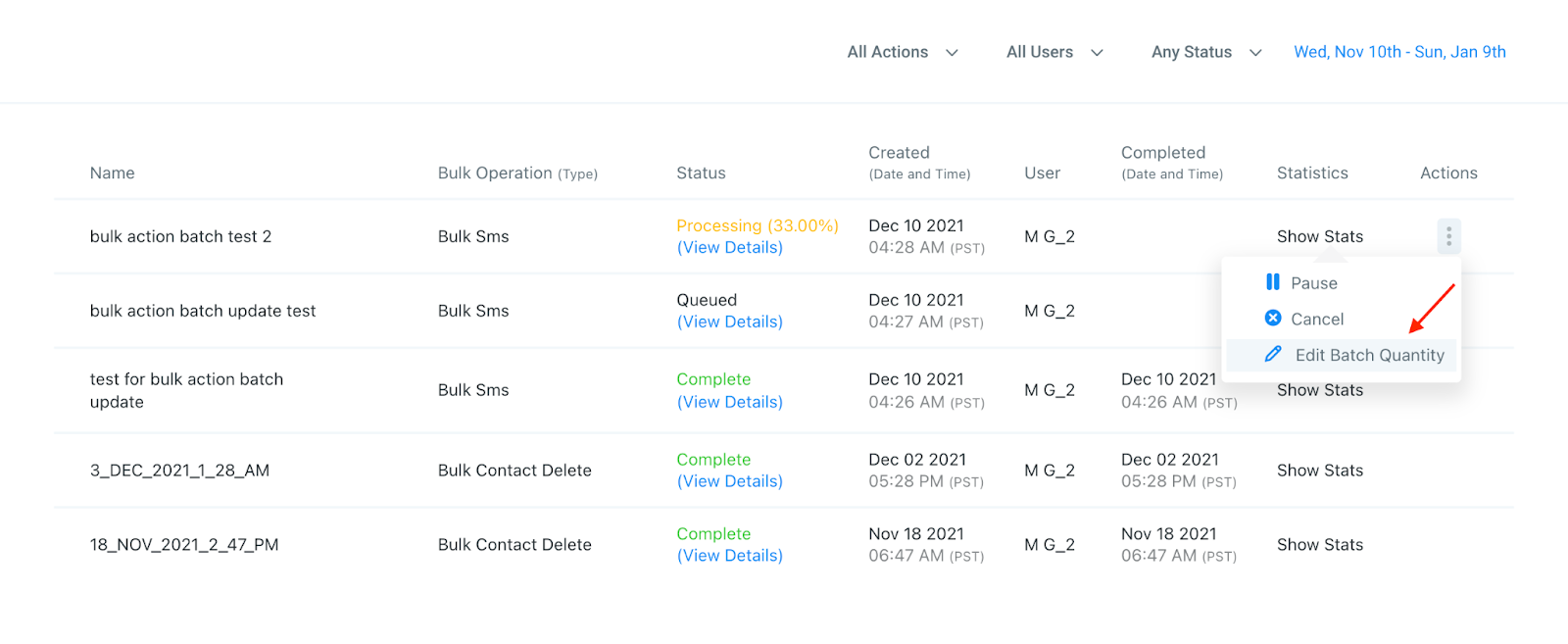
- Click the 3 dot menu icon next to the Bulk Action you wish to check, under the “Actions” column.
- A pending or queued Bulk Action is one that hasn’t yet started, but is scheduled for the future (ex. you’ve scheduled an email to go out in batches starting next week).
- A processing Bulk Action is a work in progress, meaning the batches have already started to send in drip mode (ex. you’ve scheduled an email to go out in batches every other day, and the process started 3 days ago and is 33% complete).
Step 2: Edit the Bulk Action
Tired of Being the Admin, the Marketer, and the Closer?
You didn't start your business to spend hours building funnels, managing calendars, and chasing follow-ups inside HighLevel. What if someone else handled all of that for you?
Our HighLevel-trained virtual assistants know the platform inside and out — workflows, pipelines, social scheduling, reporting — so you can focus on closing deals and growing your business. Starting at only $164 per week.
- Click the 3 dot menu icon next to the Bulk Action you wish to check, under the “Actions” column.
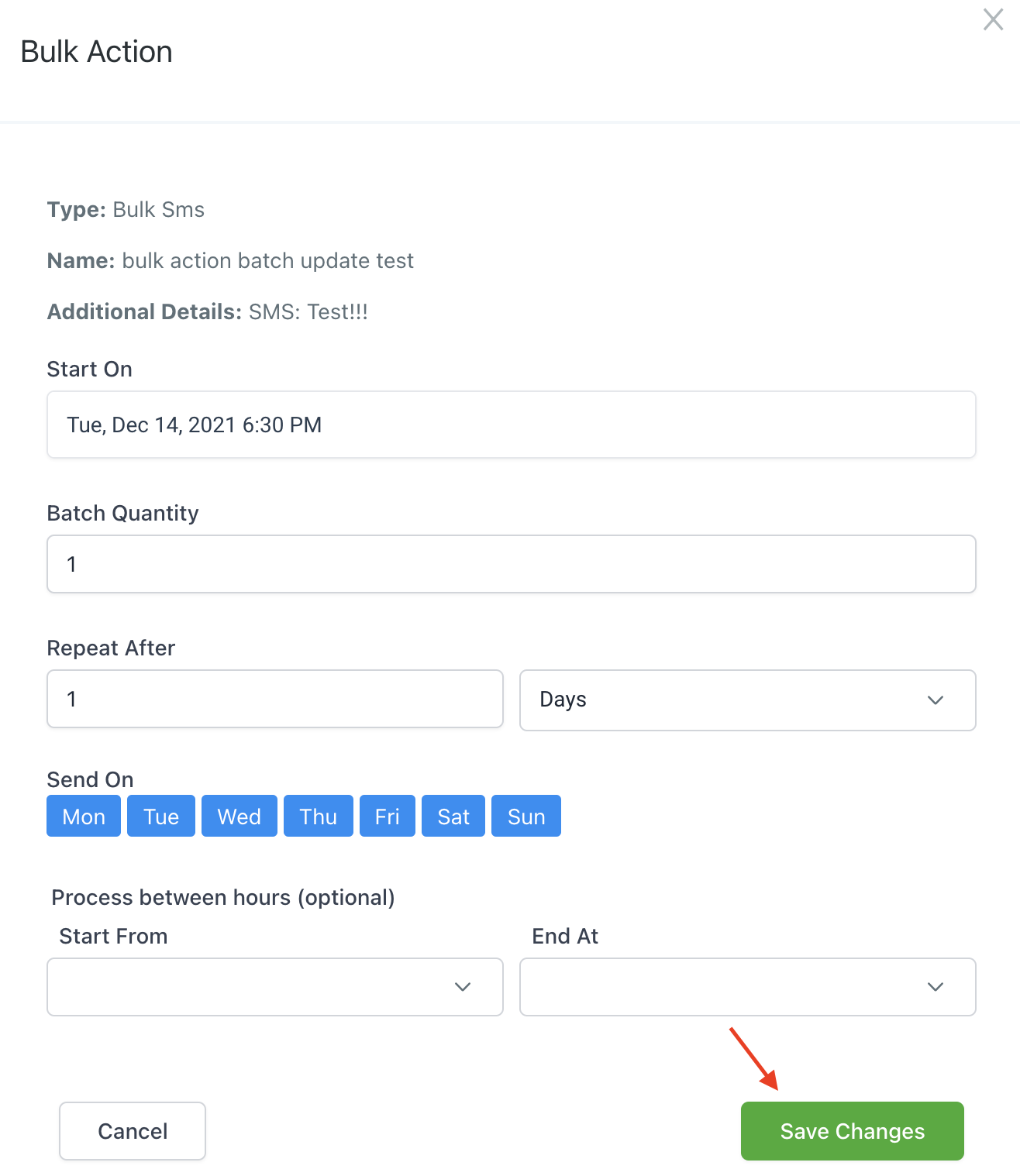
- If the Bulk Action is queued, you’ll see an “Edit” option.

- Click into it and in the popup window, you can make changes to the delivery schedule.
- Save Changes to confirm, and your Bulk Action will be updated.
- You can repeat this process until the Bulk Action’s 1st batch starts.
- If the Bulk Action is Processing, you’ll see an “Edit Batch Quantity” option.
- Click into it and in the popup window, you can make changes to the batch quantity only (i.e. instead of sending 10 emails per hour you want to update it to 5 or 50, etc.)
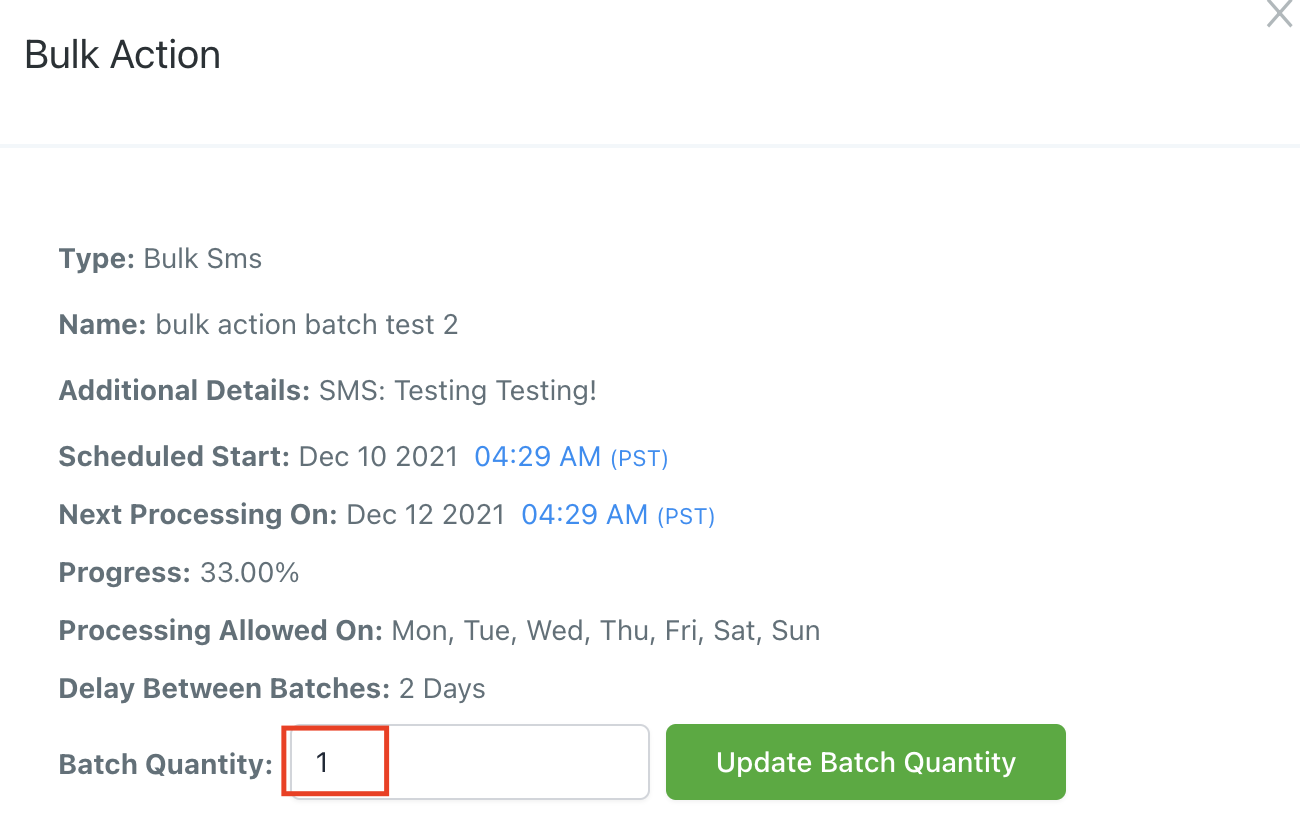
- Save Changes to confirm, and your Bulk Action will be updated.
- You can repeat this process while the Bulk Action is processing.
The Complete Operator's Playbook
Weekly strategies from top-performing agencies
Join 5,000+ operators who get weekly tutorials, templates, and strategies that are actually working right now.
Matt @ HLPT
Founder, HL Pro Tools
Matt and his team of 250+ are known for making it easy to win with GoHighLevel. They bundle tools, trainings and team time for a complete solution. You can use them for all your HighLevel needs from white label support to done-for-you fractional marketing services.
Related Articles
HighLevel Step-by-Step Tutorial: Import Contacts & Opportunities in One Go!
One of the things I love about HighLevel is that it’s always evolving. Seriously, this platform is a machine when it comes to rolling out up
Matt @ HLPTHighLevel Bulk Actions – Pipeline Change
Using the HighLevel Bulk Actions features in your Contacts/Smart Lists section, you can perform multiple one-off actions to selected or all
Matt @ HLPTUsing the Bulk Action Features within HighLevel
Using the Bulk Actions features in your Contacts/Smart Lists section within HighLevel, you can perform multiple one-off actions to selected
Matt @ HLPT