How to Add Facebook Pixel to a HighLevel Website


If you are using a Facebook Pixel to track events for your ads, you will want to add the Pixel code to your funnel and funnel steps in HighLevel.
What you will need:
- Facebook Pixel Code
- Events you want to track
Step 1: Add Pixel Code to Funnel in HighLevel
- Copy the main pixel code from your Facebook Events Manager
- Navigate to your Funnel.
- Click Settings –> Paste in your Pixel Code to the Head Tracking Code Section.
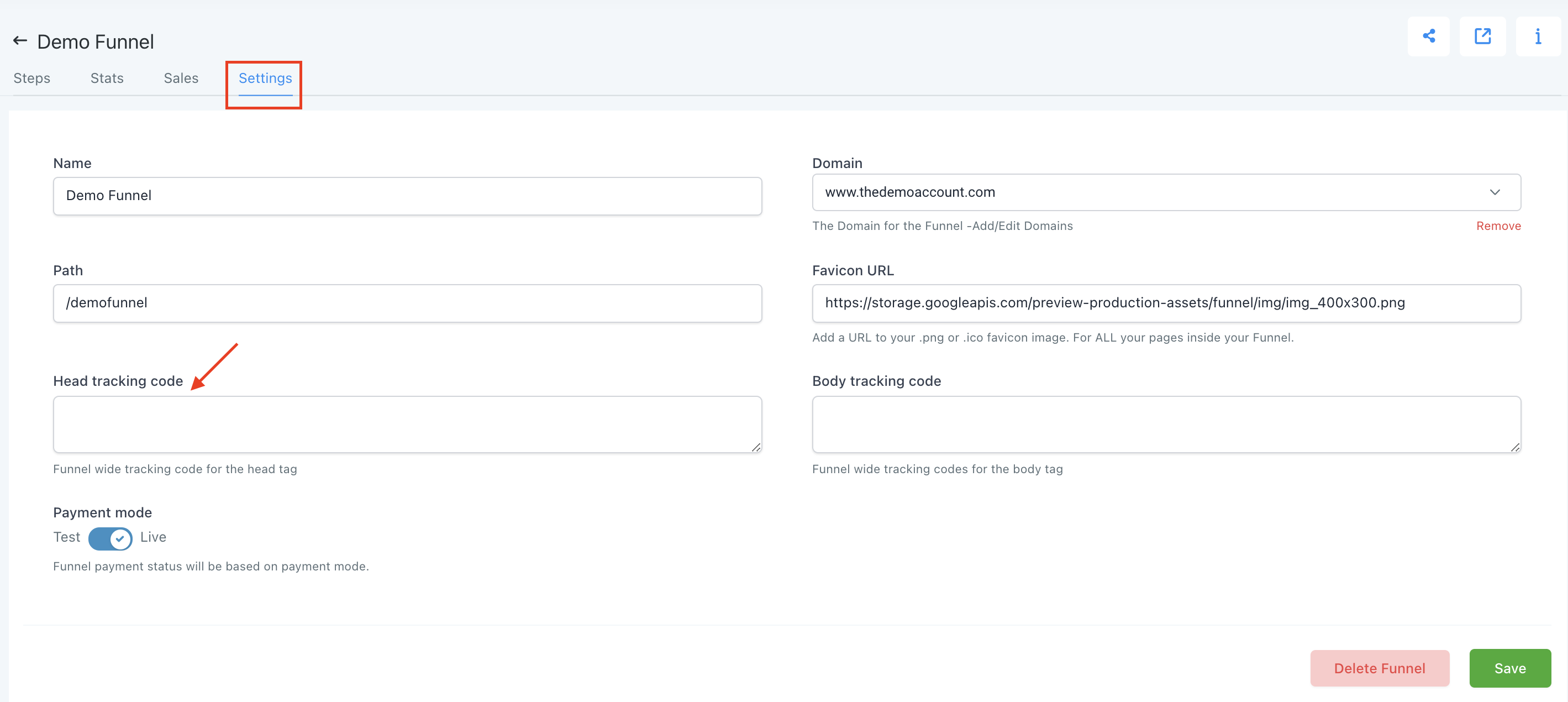
- Save your changes.
Step 2: Add in Event Specific Code to Individual Pages
- Choose the Step where the event in question is occurring (e.g. Lead would occur after an Opt In)
- Edit the Step.
- Choose Settings –> Tracking Code.
- Click Footer Code and paste in the Event Code.
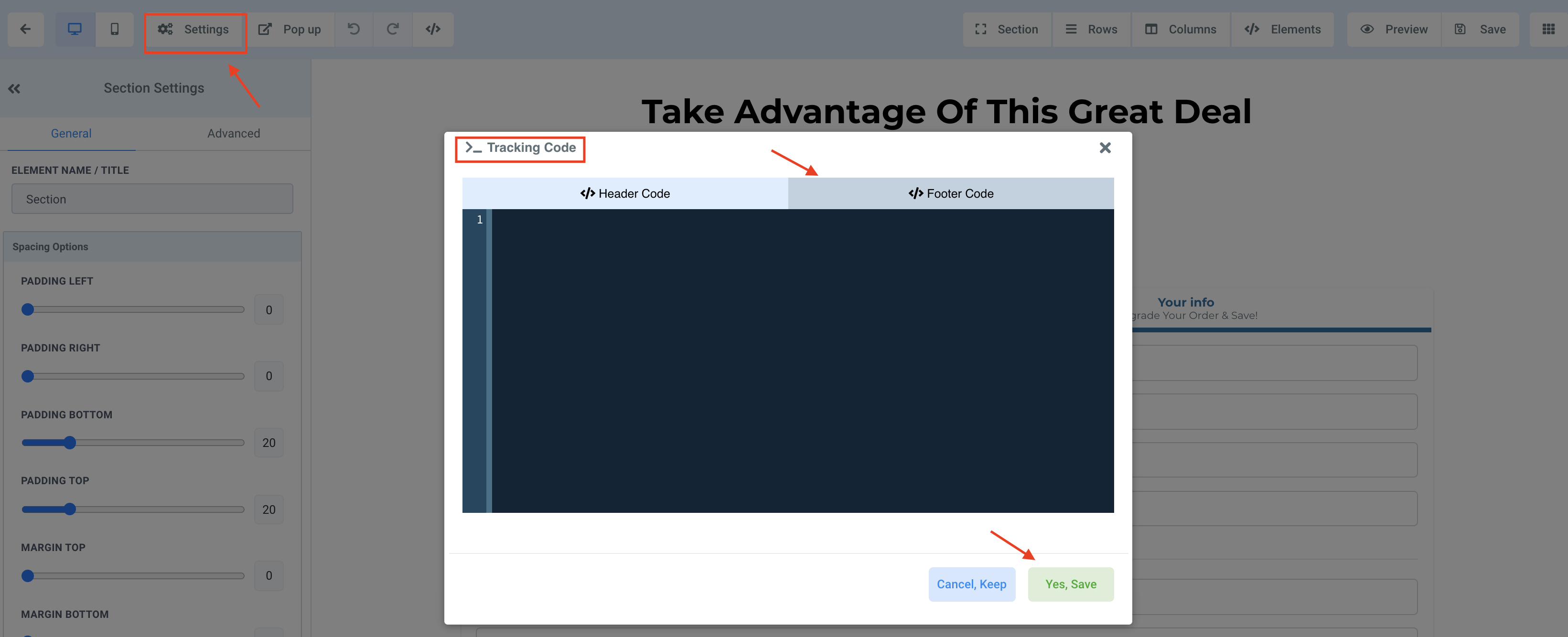
- Save your Changes.
RESOURCES:
Facebook Pixel Code (insert your ID in the IDHERE part of the code):
<!– Facebook Pixel Code –>
<script>
!function(f,b,e,v,n,t,s)
Tired of Being the Admin, the Marketer, and the Closer?
You didn't start your business to spend hours building funnels, managing calendars, and chasing follow-ups inside HighLevel. What if someone else handled all of that for you?
Our HighLevel-trained virtual assistants know the platform inside and out — workflows, pipelines, social scheduling, reporting — so you can focus on closing deals and growing your business. Starting at only $164 per week.
{if(f.fbq)return;n=f.fbq=function(){n.callMethod?
n.callMethod.apply(n,arguments):n.queue.push(arguments)};
if(!f._fbq)f._fbq=n;n.push=n;n.loaded=!0;n.version=’2.0′;
n.queue=[];t=b.createElement(e);t.async=!0;
t.src=v;s=b.getElementsByTagName(e)[0];
s.parentNode.insertBefore(t,s)}(window, document,’script’,
‘https://connect.facebook.net/en_US/fbevents.js’);
fbq(‘init’, ‘IDHERE’);
fbq(‘track’, ‘PageView’);
</script>
<noscript><img height=”1″ width=”1″ style=”display:none”
src=”https://www.facebook.com/tr?id=IDHERE’&ev=PageView&noscript=1″
/></noscript>
<!– End Facebook Pixel Code –>
Facebook Event Code:
<script>
fbq(‘track’, ‘EVENTHERE’);
</script>
List of Facebook Standard Events:
The Complete Operator's Playbook
Weekly strategies from top-performing agencies
Join 5,000+ operators who get weekly tutorials, templates, and strategies that are actually working right now.
Matt @ HLPT
Founder, HL Pro Tools
Matt and his team of 250+ are known for making it easy to win with GoHighLevel. They bundle tools, trainings and team time for a complete solution. You can use them for all your HighLevel needs from white label support to done-for-you fractional marketing services.
Related Articles
HighLevel Website Builder 101: The Complete Guide to Building a Website From Scratch
Learn how to build a website from scratch in HighLevel. This complete guide covers the website builder, page creation, sections, elements, s
Matt @ HLPTHighLevel WordPress Migration 101: The Complete Guide to Migrating Your WordPress Site
Learn how to migrate your WordPress site to HighLevel. This complete guide covers content migration, page recreation, domain transfer, SEO p
Matt @ HLPTHighLevel Website Templates 101: The Complete Guide to Launching a Website From a Template
Learn how to launch a website from a template in HighLevel. This complete guide covers template selection, page editing, domain setup, SEO s
Matt @ HLPT