How To Clone and Share Funnels in HighLevel


Key Takeaways
- You may want to clone a funnel or website in HighLevel from time to time.
- This can be useful if you are copying information and want to create a similar funnel or website, but rather than starting from scratch, you may just want to make a few adjustments.
You may want to clone a funnel or website in HighLevel from time to time. This can be useful if you are copying information and want to create a similar funnel or website, but rather than starting from scratch, you may just want to make a few adjustments.
Follow these quick steps to learn how in HighLevel:
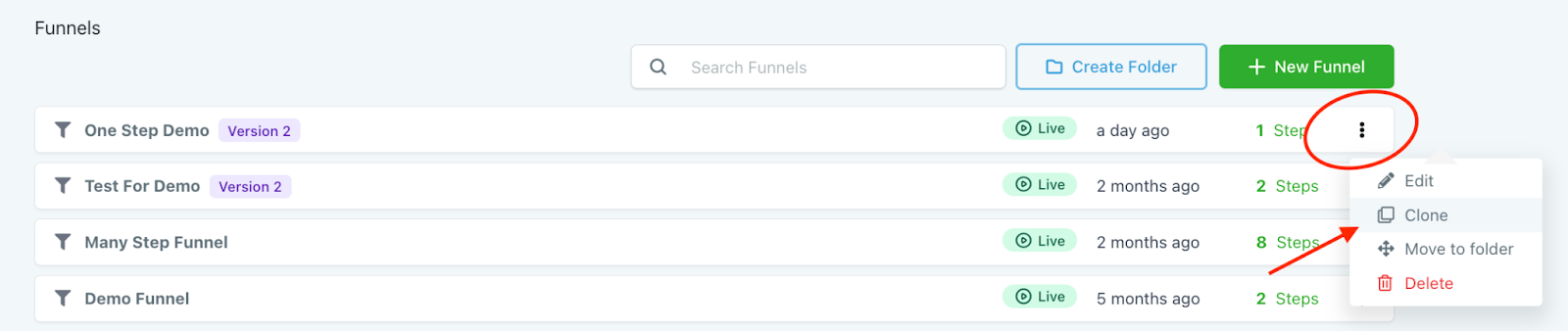
Step 1: Click the three dots next to the funnel or website.
Step 2: Select “Clone”.
Tired of Being the Admin, the Marketer, and the Closer?
You didn't start your business to spend hours building funnels, managing calendars, and chasing follow-ups inside HighLevel. What if someone else handled all of that for you?
Our HighLevel-trained virtual assistants know the platform inside and out — workflows, pipelines, social scheduling, reporting — so you can focus on closing deals and growing your business. Starting at only $164 per week.
Step 3: Name the funnel/website.
Step 4: Confirm your “location” (which is your account/system name).
Step 5: Click “Clone Funnel”.

Step 6: The newly cloned funnel/website will appear in your list.
The Complete Operator's Playbook
Weekly strategies from top-performing agencies
Join 5,000+ operators who get weekly tutorials, templates, and strategies that are actually working right now.
Matt @ HLPT
Founder, HL Pro Tools
Matt and his team of 250+ are known for making it easy to win with GoHighLevel. They bundle tools, trainings and team time for a complete solution. You can use them for all your HighLevel needs from white label support to done-for-you fractional marketing services.
Related Articles
HighLevel Funnels 101: The Complete Guide to Building and Launching Your First Funnel
Learn how to build and launch funnels in HighLevel. This complete guide covers funnel templates, page editing, domain setup, form integratio
Matt @ HLPTCustomizing Funnel and Website Colors in HighLevel
Within HighLevel’s funnel or website builder, you can completely customize each step, including colors, fonts, and more. Follow these steps
Matt @ HLPTConverting Funnel Steps and Website Pages Within HighLevel
If you want to convert or import a funnel or website page into a new funnel or website you are building in HighLevel, you can do so using th
Matt @ HLPT