How to Create and Edit Pipelines in HighLevel


Key Takeaways
- Using HighLevel’s Pipelines feature, you can more efficiently manage your leads for your business.
- This tutorial will show you how you can easily create a new pipeline, or make changes to existing ones within HighLevel.
Using HighLevel’s Pipelines feature, you can more efficiently manage your leads for your business. This tutorial will show you how you can easily create a new pipeline, or make changes to existing ones within HighLevel.
Step 1: Accessing the Pipelines page in HighLevel
- Navigate to Settings > Pipelines
- Here you’ll see a list of all your existing pipelines.
- You can click the Edit or Delete icons to make changes or delete a pipeline.
- Click the green button to add a new pipeline
Tired of Being the Admin, the Marketer, and the Closer?
You didn't start your business to spend hours building funnels, managing calendars, and chasing follow-ups inside HighLevel. What if someone else handled all of that for you?
Our HighLevel-trained virtual assistants know the platform inside and out — workflows, pipelines, social scheduling, reporting — so you can focus on closing deals and growing your business. Starting at only $164 per week.
Step 2: Adding a New Pipeline in HighLevel
- Click the +Create new pipeline button
- Fill out the information in the popup window.
- Give the pipeline a name, add stages, and choose the visibility.
- NOTE: you can determine whether or not each individual stage is visible in the pie chart and funnel chart, as well as choose if the entire pipeline as a whole is visible or not.
- Using the arrows next to each stage, you can modify the order.
- Continue adding as many stages as you’d like.
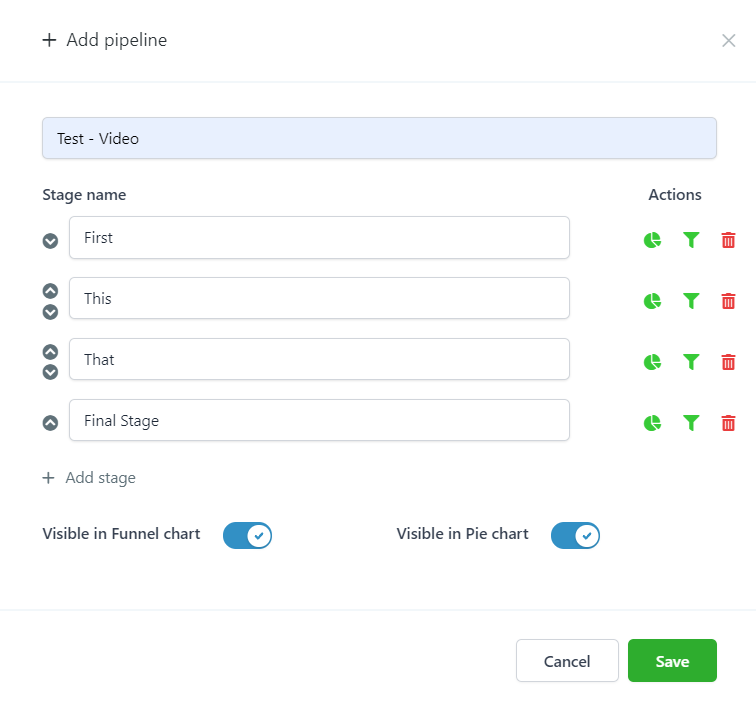
- Save to confirm your changes.
- Now this newly added pipeline will appear on your Pipelines page.
- You can click the edit icon to make any additional edits.
The Complete Operator's Playbook
Weekly strategies from top-performing agencies
Join 5,000+ operators who get weekly tutorials, templates, and strategies that are actually working right now.
Matt @ HLPT
Founder, HL Pro Tools
Matt and his team of 250+ are known for making it easy to win with GoHighLevel. They bundle tools, trainings and team time for a complete solution. You can use them for all your HighLevel needs from white label support to done-for-you fractional marketing services.
Related Articles
HighLevel Pipelines 101: The Complete Guide to Setting Up Pipelines and Managing Opportunities
Learn how to set up pipelines and manage opportunities in HighLevel. This complete guide covers pipeline creation, stage configuration, oppo
Matt @ HLPTHow to Utilize Lead Values in HighLevel Pipelines and Triggers
Using lead values in pipelines allows you to help manage your business effectively. Typically a new lead, or ‘cold’ lead, in a beginning pip
Matt @ HLPTHow to End an Opportunity in HighLevel
Depending on the situation, if an Opportunity isn’t going to work out or close, you may want to delete or archive the Opportunity. There are
Matt @ HLPT