How To Customize Membership Settings in HighLevel


When using the Membership section in HighLevel, you can customize various settings and features to make the Membership experience work for your users exactly as you wish.
Step 1: Accessing the Settings in HighLevel
- Navigate to Sites > Membership
- Here you can access “Site Details”, “Custom Domains”, and “Email Settings”

Step 2: Customizing the Settings
Tired of Being the Admin, the Marketer, and the Closer?
You didn't start your business to spend hours building funnels, managing calendars, and chasing follow-ups inside HighLevel. What if someone else handled all of that for you?
Our HighLevel-trained virtual assistants know the platform inside and out — workflows, pipelines, social scheduling, reporting — so you can focus on closing deals and growing your business. Starting at only $164 per week.
- Click into “Site Details” to update Site Info, Branding, and Builder Settings in HighLevel.
- Site Info: Add your site title, subdomain, support information, and any custom code.
- Branding: add a logo and favicon
- Builder Settings: toggle on or off the download video option
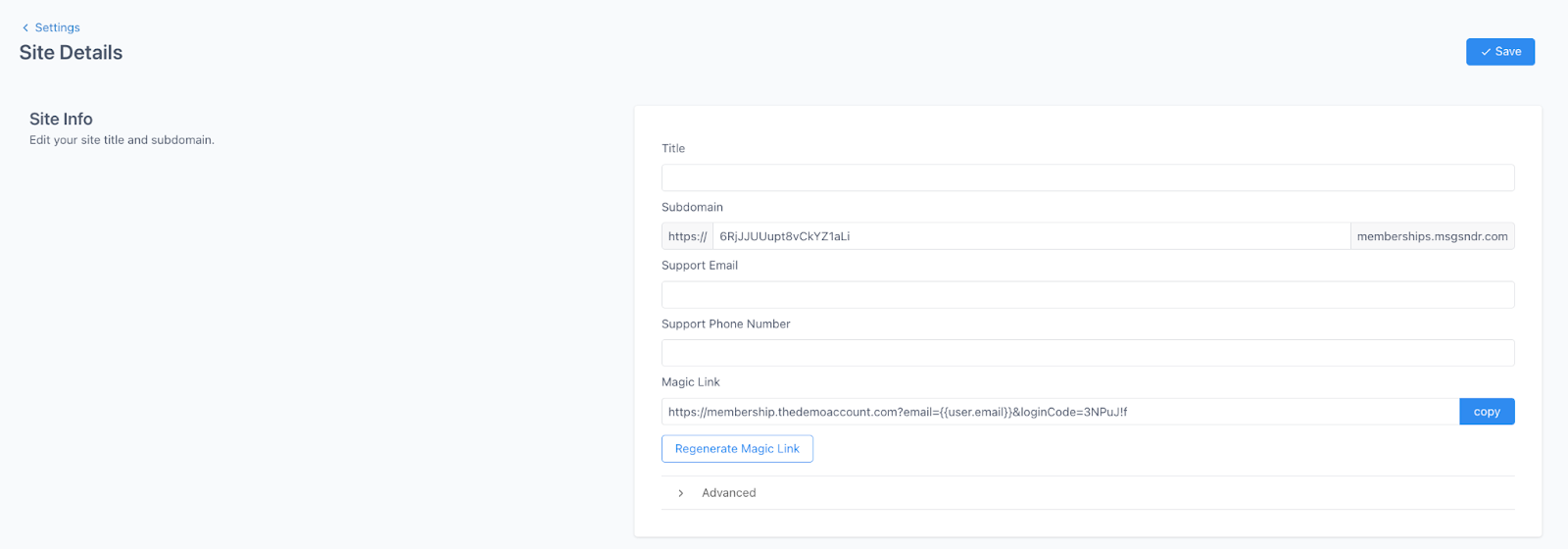
- Click into “Custom Domains” to add a custom domain.

- Click into “Email Settings” to update email settings for the welcome and drip email.
- Toggle on or off the option to automatically send a welcome email when someone completes an offer checkout
- Toggle on or off the option to automatically send an email when drip category is available

- Save any changes you make before leaving the Settings sections.
The Complete Operator's Playbook
Weekly strategies from top-performing agencies
Join 5,000+ operators who get weekly tutorials, templates, and strategies that are actually working right now.
Matt @ HLPT
Founder, HL Pro Tools
Matt and his team of 250+ are known for making it easy to win with GoHighLevel. They bundle tools, trainings and team time for a complete solution. You can use them for all your HighLevel needs from white label support to done-for-you fractional marketing services.
Related Articles
How To Setup Drip Content for Subcategories in HighLevel Memberships
Step 1: Navigate to Membership > Products > All Products Step 2: Click into a particular product. Step 3: Click the + next to the category,
Matt @ HLPTHow To Add A Customer to Your HighLevel Membership Area, Course or Offer
It’s important to understand the different options for how you may add somebody to your product or to your offer or to your membership area
Matt @ HLPTHow To Use HighLevel Membership Themes
Using Membership Themes allows you to enhance your members’ experience while honing your brand identity. You can customize your product pag
Matt @ HLPT