How to Setup Your XML Sitemap in HighLevel


Key Takeaways
- This tutorial will show you how to use HighLevel’s XML sitemap feature for your domains.
- It is a great feature which functions essentially as the blueprint of your website to help with SEO as it indexes the web pages.
- To utilize the XML sitemap, follow these steps:.
This tutorial will show you how to use HighLevel’s XML sitemap feature for your domains. It is a great feature which functions essentially as the blueprint of your website to help with SEO as it indexes the web pages. To utilize the XML sitemap, follow these steps:
- Navigate to Settings > Domains in HighLevel.

- Click the XML sitemap link next to the domain you wish to update.
- In the popup window, you can expand the view using the + and – to see the different pages within a particular domain.
Tired of Being the Admin, the Marketer, and the Closer?
You didn't start your business to spend hours building funnels, managing calendars, and chasing follow-ups inside HighLevel. What if someone else handled all of that for you?
Our HighLevel-trained virtual assistants know the platform inside and out — workflows, pipelines, social scheduling, reporting — so you can focus on closing deals and growing your business. Starting at only $164 per week.

- Click Proceed.
- On the next page, you can create a custom path, edit an existing one, or add a new one.
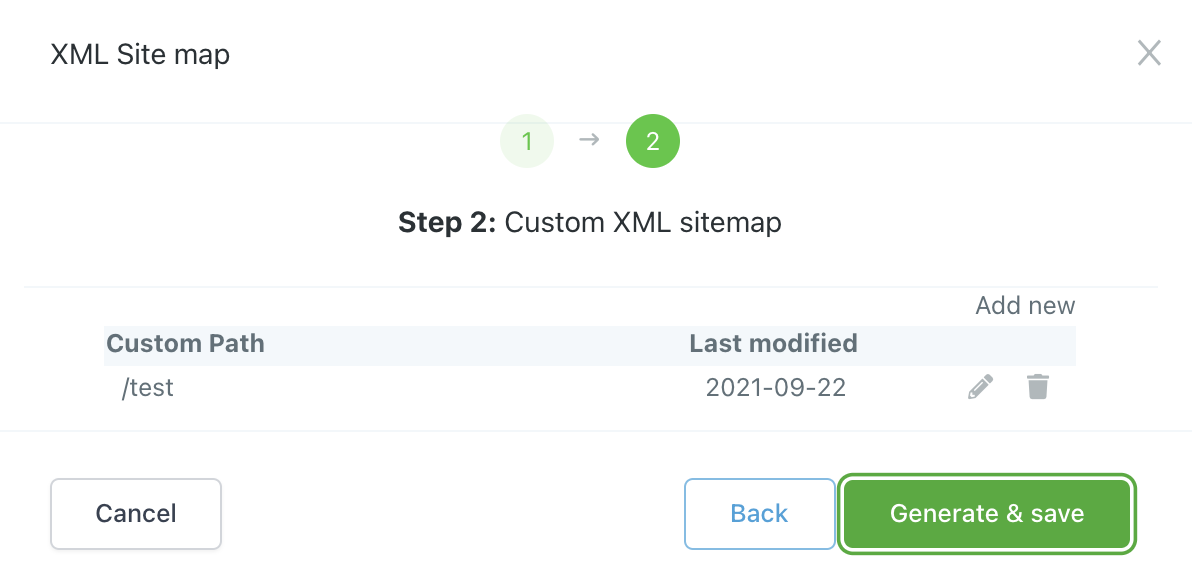
- Once you’re satisfied with your updates/additions/changes, click “Generate and Save”.
- A new popup window will appear. Click into the link which will direct you to a page where you can view the code of your new SiteMap.

- Here you can verify the information you just entered.
The Complete Operator's Playbook
Weekly strategies from top-performing agencies
Join 5,000+ operators who get weekly tutorials, templates, and strategies that are actually working right now.
Matt @ HLPT
Founder, HL Pro Tools
Matt and his team of 250+ are known for making it easy to win with GoHighLevel. They bundle tools, trainings and team time for a complete solution. You can use them for all your HighLevel needs from white label support to done-for-you fractional marketing services.
Related Articles
How to Command Ask AI in HighLevel
You are in the zone, building out a massive new campaign for a client. But then the friction hits. You need to write three different emails,
 Matt @ HLPT
HighLevel Website Builder 101: The Complete Guide to Building a Website From Scratch
Learn how to build a website from scratch in HighLevel. This complete guide covers the website builder, page creation, sections, elements, s
Matt @ HLPTHighLevel WordPress Migration 101: The Complete Guide to Migrating Your WordPress Site
Learn how to migrate your WordPress site to HighLevel. This complete guide covers content migration, page recreation, domain transfer, SEO p
Matt @ HLPT